Mac Manager
Home Services Products Upgrades Specials Web Design About

Service & repairsPackage deals
Windows on Mac
Training / tuition
Helpful hints
Second-hand
AppleScriptFAQ


Products: Parallels Desktop for Mac

Parallels Desktop for Mac

$119


Parallels Desktop for Mac gives Apple users the ability to run Windows, Linux, or any other PC-based operating system and their critical applications at the same time as Mac OS X on any Intel-based Mac.

Unlike dual-boot solutions such as Apple's Boot Camp, in which users must completely shut down Mac OS X and endure a full OS start-up cycle to access an important application, Parallels empowers users with the ability to run important Windows programs like Outlook, Access, Internet Explorer and any other application without having to give up the usability and functionality of their Mac OS X machine even for a few minutes.


Why is Parallels Desktop the best solution for running Windows on a Mac?

Unmatched ease of use

Parallels Desktop for Mac is easy to download, install and use. Download the program and install it with a single click. Build a virtual machine in seconds using helpful wizards. Configure virtual machines using a simple, web-inspired interface.


Run any OS at the same time as Mac OS X

Use any version of Windows (3.1, 95, 98, ME, 2000, NT, XP, 2003, Vista, 7), any Linux distribution, FreeBSD, Solaris, OS/2, eComStation, or MS-DOS in secure environments running alongside, not instead of, Mac OS X.

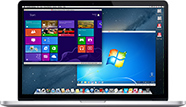
With three different modes of running Windows: Full Screen, Single Window (pictured right) and Coherence, you can choose the best way to work.

  iMac running Parallels Desktop

Windows that works exactly like a genuine Windows PC

Use applications, access the internet, and work with any piece of hardware just like you would on a real PC, without the hassle of shutting down and booting up Windows, or switching between terminals. Create as many 'virtual machines' as your like, each with a different version of Windows. Perfect for developers and web designers to test their product in every type of operating system, without the expense of buying multiple PC's.


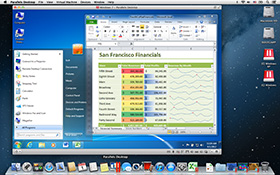
Parallels Desktop Screenshot  

Easily share files & folders between Windows and Mac OS X

Using the Parallels Shared Folder tool, you can easily share documents and folders, or copy and paste data between any Windows XP, 2003 or 2000 virtual machine and Mac OS X. No networking or complicated set up required.


Optimise virtual machine performance and save storage space

Parallels Desktop for Mac includes Parallels Compressor, a powerful built in tool that can improve virtual machine performance and conserve hard drive space by reducing the size of virtual hard disk images by 50% or more.


Minimum system requirements

The following is a basic list of requirements to run Parallels Desktop with Windows:

Windows XP or earlier
Windows 7 - any edition
  • A Mac with an Intel processor
  • 5GB of hard drive space
  • 1GB of memory (2GB strongly recommended)
  • A version of Windows XP or earlier
  • A Mac with an Intel Processor
  • 15GB of hard drive space
  • 2GB of memory (3GB strongly recommended)
  • Any version of Windows 7

To have Windows with Parallels Desktop set up for you in your home or office, make a booking with one of our skilled technicians.


Monday - Friday
9:00am - 5:30pm

Phone: 1300 650 126

Mobile: 0407 026 037

Email: click here

Copyright © 2012 Mac Manager